
Extemporaneous Debate
This event appeals to students who enjoy thinking quickly, tackling a wide range of topics, and engaging in real-time argumentation. While students with experience in debate or speaking extemporaneously may feel right at home, public speakers and interpers who are thoughtful, quick-witted, and curious can also find this format exciting and rewarding.
Successful students in Extemp Debate are often analytical, confident, persuasive, and logical thinkers with a broad base of knowledge and the ability to work independently under pressure.
Time Limits
| Speech | Time Limit | Purpose |
|---|---|---|
| Proposition Constructive | 2 minutes | The debater in favor of the resolution presents his or her case/position in support of the topic. |
| Cross Examination of Proposition | 1 minute | The opposition debater asks the proposition questions. |
| Opposition Constructive | 2 minutes | The debater against the resolution or the proposition’s case presents his or her case/position. |
| Cross Examination of Opposition | 1 minute | The proposition debater asks the opposition questions. |
| Mandatory Prep Time | 1 minute | Both debaters have one minute to prepare their rebuttals. |
| Proposition Rebuttal | 2 minutes | The proposition debater refutes the main idea of the opposition and supports their main ideas. |
| Opposition Rebuttal | 2 minutes | The opposition debater refutes the main idea of the proposition and supports their main ideas. |
| Mandatory Prep Time | 1 minute | Both debaters have one minute to prepare their rebuttals. |
| Proposition Rebuttal | 2 minutes | In this final speech the proposition crystallizes the round for the judge and tries to establish sufficient reason for a vote in favor of the resolution. |
| Opposition Rebuttal | 2 minutes | In this final speech the opposition crystallizes the round for the judge and tries to establish sufficient reason for a vote against the proposition’s case and/or the resolution. |

Extemp debate imparted onto me, the importance of having to be well read, and open minded about a wide variety of topics. The event also helped me work on my word economy and efficiency when discussing important points in every day conversation. Finally, the compressed format, and scope of the topics also gave me an opportunity to engage in really enjoyable debate on topics that I would never have been able to without it.
Is your program new to the NSDA?
Welcome!
Instructions
Welcome Back!
Instructions
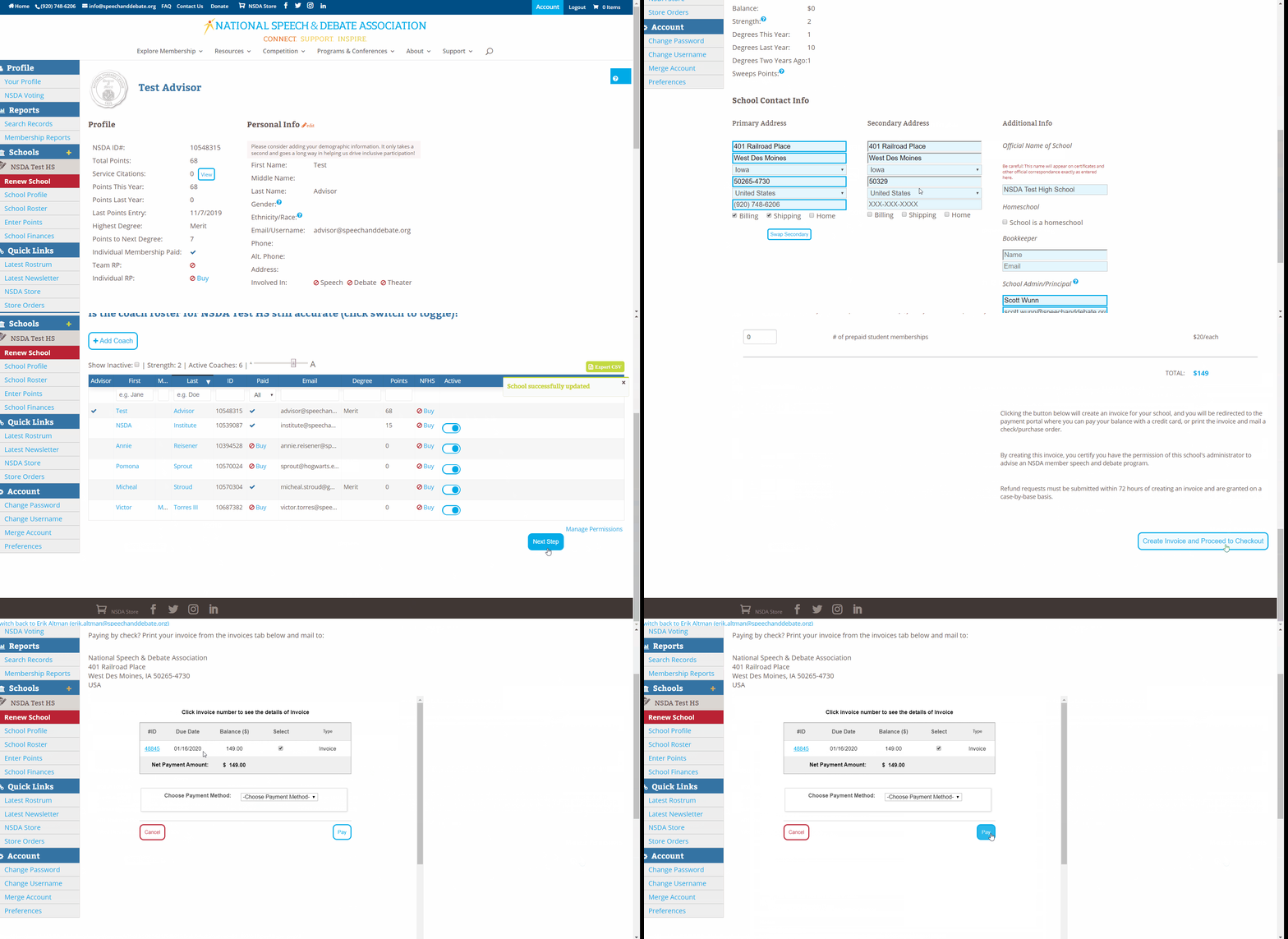
- Program advisors can visit www.speechanddebate.org and click Member Login in the top right corner of the page. Use your username and password to log in to your account. Once you’ve logged in, click “Account” in the upper right corner, which will take you to your profile page. Please click “Renew School”, in red, from the left menu and follow the prompts at the top of the page to renew your school.
- High school membership is $149, with an option to upgrade to the all-school team Resource Package for an additional $199. Each individual high school student membership is a one-time $20 fee.
- Middle school membership is $75, with an option to upgrade to the all-school team Resource Package for an additional $199. Each individual middle school student membership is a one-time $10 fee.
- To finalize the renewal, follow the prompts on the page to review the following:
Step 1. Confirm information on the school profile page. Once confirmed/updated, click the “Next Step” button.
Step 2. Confirm the coaches listed. Once confirmed/updated, click the “Next Step” button.
Step 3. Create the invoice. The annual dues are automatically selected. You can use the toggle to select other options such as coach memberships, student memberships, insurance, and the Resource Package. The prices for each item are listed on the right side of your screen, and a running total is at the bottom in blue. When done, “Create Invoice and Proceed to Checkout”.
The system allows you to “Pay Now”, with a credit card or you can email the invoice to yourself or print out the pdf.
Need a Visual? Click here to watch our brief tutorial!
(The GIF will loop continuously; there is no audio.)
Extemporaneous Debate
XDB • High School Supplemental Event
Extemporaneous Debate (XDB) is a one-on-one debate event in which students are presented with a new resolution each round and have 30 minutes to prepare before delivering arguments, refutation, and rebuttals. Unlike traditional debate events, which focus on a single topic throughout a tournament, Extemp Debate introduces a variety of resolutions, testing students’ adaptability and critical thinking across a broad range of issues. The use of evidence is permitted, but due to the short preparation time, the event emphasizes reasoning, structure, and effective delivery over detailed research.